Introduction:
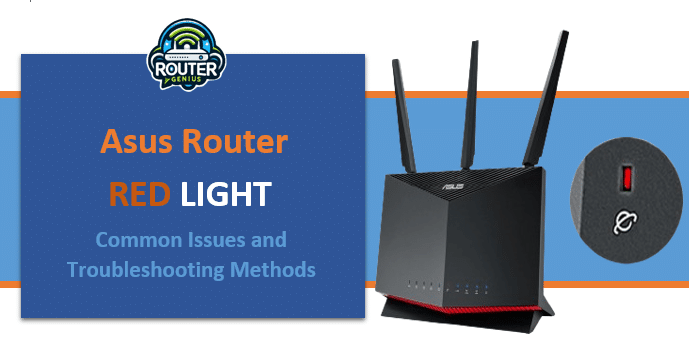
Asus is one of the leading networking brands known for producing high-quality routers. However, even the best routers can display error lights at times. One such common issue faced by Asus router users is when the router shows a solid red light. This article discusses the various reasons why the Asus router may display a red light and provides steps to troubleshoot the issue.
- Introduction:
- Causes of Red Light
- Hardware Issue
- Firmware Problem
- Overheating
- Power Issues
- Connection Problems
- Configuration Issues
- Interference
- Hardware/Software Faults
- Troubleshooting Asus Router Red Light
- Restart the Router
- Check Cable Connections
- Update Firmware
- Check Router Placement
- Reset Router to Factory Defaults
- Try Different Power Source
- Check Nearby Wireless Interference
- Test Hardware Components
- Contact Technical Support
- Consider Router Replacement
- Asus router Red Light After Reset
- FAQs
-
- Q. What should I do if resetting doesn’t fix red light?
- Q. How to troubleshoot red light when router is new?
- Q. What causes constant red blinking light on router?
- Q. Can interference cause router LED to turn red?
- Q. How to fix red light on Asus router if reset doesn’t help?
-
- Conclusion
Causes of Red Light
There can be several possible causes for the Asus router wan light red LED turning red. Some of the common ones are:
Hardware Issue
A red light on the Asus router could indicate an hardware problem. Some components like the wireless card, Ethernet ports or processor may have issues causing the red light.
Firmware Problem
Outdated or corrupted firmware is another common cause. An outdated firmware may lack bug fixes and new features causing instability. A corrupted firmware can cause the router to malfunction.
Overheating
Excess heat in and around the router is not good for components. Prolonged overheating can damage internal parts leading to the red light. Make sure to keep the router ventilated.
Power Issues
Problems with the power delivery like loose connections, surge protector issues or power fluctuations can disrupt the router’s functioning.
Connection Problems
Loose cables, disconnected cables or non-compatible cables can interfere with internet connectivity triggering the red light.
Configuration Issues
Incorrect wireless security settings, invalid DHCP configuration, wrong DNS settings etc. can disrupts the router operations.
Interference
Nearby electronic devices, cordless phones or baby monitors emitting radio signals can interfere with wireless signals. This causes connectivity drops.
Hardware/Software Faults
Some component failures due to manufacturing defects, normal wear and tear or usage stresses may cause the router to malfunction.
Troubleshooting Asus Router Red Light
Here are some steps to troubleshoot Asus router red light no internet issue:
Restart the Router
Unplug the router’s power cord, wait for 30 seconds and plug it back. This resets the router.
Check Cable Connections
Ensure all Ethernet cables are firmly connected to router and modem/switch. Tighten if loose.
Update Firmware
Check for latest firmware from manufacturer’s website and update if available using the web UI.
Check Router Placement
Ensure router vents are not blocked and it’s in an open well-ventilated area away from other electronics.
Reset Router to Factory Defaults
Use the reset button to wipe all settings and restore factory default configuration
Try Different Power Source
Connect router to another power outlet or surge protector to rule out any power issues.
Check Nearby Wireless Interference
Identify 2.4GHz devices causing interference and adjust router channel/frequencies.
Test Hardware Components
Remove/replace router components like antennas, cables one by one to isolate faulty part.
Contact Technical Support
Get in touch with Asus support for hardware diagnostics if problem persists after all steps.
Consider Router Replacement
As a last resort, replace the router if under warranty or has exceeded life.
Asus router Red Light After Reset
To troubleshoot the Asus router with a solid red power light after reset, I disconnected the power cord from the router for 30 seconds to fully discharge any remaining power. I then reconnected only the power cord to let the router fully boot up. After several minutes, the power light turned solid white and I was able to access the web UI again to complete the reset process. Resetting the power fixed the issue.
FAQs
Here are some frequently asked questions about how to fix red light on Asus router issues:
Q. What should I do if resetting doesn’t fix red light?
A. Check firmware, cables, router placement, power source. Isolate hardware fault by testing components individually. Contact support for hardware diagnosis.
Q. How to troubleshoot red light when router is new?
A. Ensure all cables are inserted properly. Check for latest firmware update online. Router may have manufacturing defects, contact brand support for replacement if under warranty.
Q. What causes constant red blinking light on router?
A. Blinking red light indicates connectivity issues – check cables, latest firmware, router placement or interference sources. Device may need replacement if issue exists post troubleshooting.
Q. Can interference cause router LED to turn red?
A. Yes, nearby wireless devices emitting radio signals in 2.4GHz band can interfere. Adjust wireless channel/frequency of router, maintain distance from other emitters or try 5GHz connection.
Q. How to fix red light on Asus router if reset doesn’t help?
A. Check that the firmware is latest. Isolate hardware fault by testing components. Contact Asus support for remote troubleshooting and diagnosis if issue persists after basic troubleshooting. Consider router replacement as last option.
Conclusion
A solid red light Asus router indicates some issue that needs troubleshooting and resolution. This article discussed the common causes for red light and provided steps to troubleshoot through software and hardware checks. Following the methods systematically can help identify and resolve connectivity problems. In difficult cases, it’s best to contact Asus technical support for advanced hardware diagnosis and troubleshooting guidance. With proper troubleshooting, the Asus router internet light red issue can usually be fixed without requiring a replacement.

.webp "Link Line Puzzle")
.webp "Save Girl")





.webp "Icing On Doll Cake")